CI was green. My live site stayed stale.
Published: 3 November 2026 · 5 min read · Author: Shoaib Sarwar
I was wiring GitHub Actions so this portfolio would deploy to Hostinger over FTPS on every push to
main. Build the Vite site, upload the files, done. That was the plan.
The workflow used SamKirkland/FTP-Deploy-Action. Secrets for host, username and password were set.
The job finished with a green check. I refreshed shoaibsarwar.com and saw the old version.
I did the usual useless debugging first. Hard refresh. Different browser. Wait a few minutes for “propagation”. None of that helped, because the new files were never where the domain looks.
That combination is annoying. CI says success. The browser says nothing changed.
What went wrong
In .github/workflows/git-cli.yml I had defaulted the remote folder like this:
server-dir: ${{ secrets.HOSTINGER_REMOTE_DIR || 'public_html/' }}
On Hostinger, an FTP account often already opens inside the website directory
(commonly labelled public_html in hPanel). From that login, public_html/ is not
“the web root”. It is a subdirectory named public_html.
So the action uploaded into something like public_html/public_html/.
The real site root — the folder the domain actually serves — never got the new build.
The job still reported success because the upload itself worked. It just landed in the wrong place.
I confirmed it in Hostinger’s File Manager: the familiar site files at the real web root, and a nested
public_html folder next to them holding the “successful” deploy. Embarrassing, and very easy to miss
if you only stare at the Actions tab. The image below is an illustration of that layout, not a screenshot from my account.
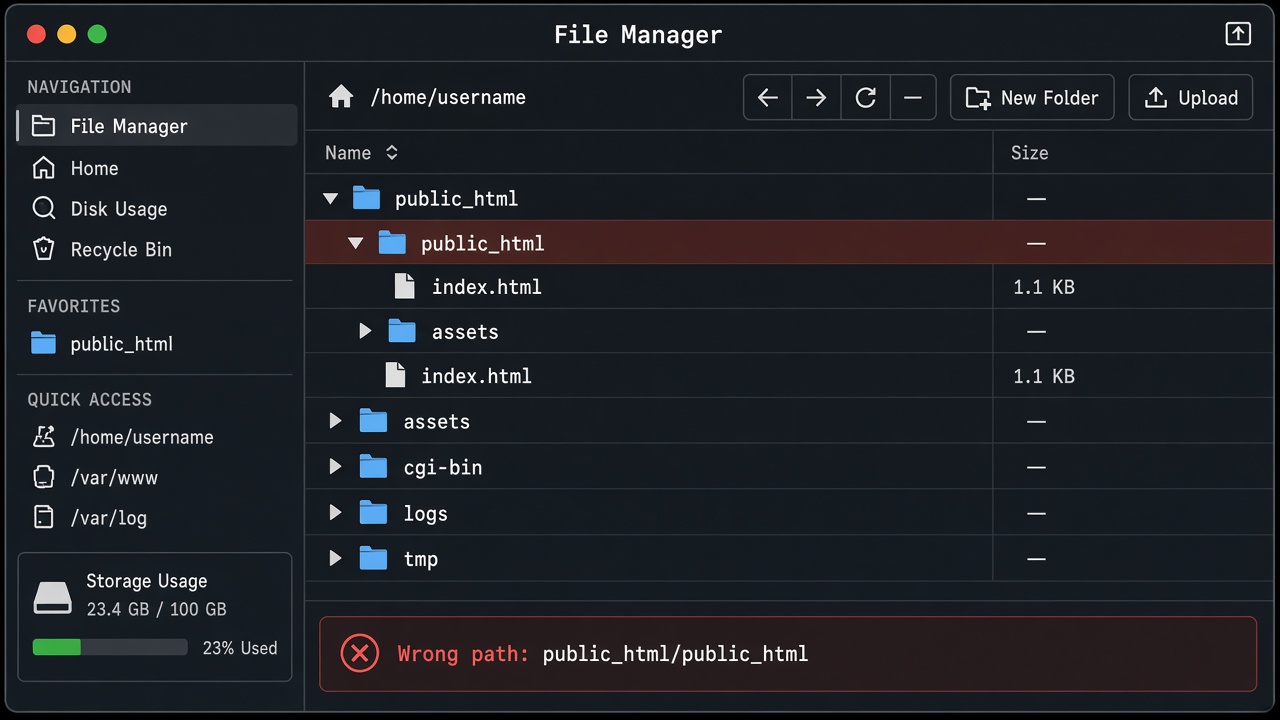
Relative server-dir is joined to the FTP account’s starting directory — not to “the domain”.
Why it really happened
I treated public_html as a universal name for “where websites live”. On shared hosting that label
shows up everywhere, so it felt safe as a default. It was not.
FTP paths are relative to the account’s home directory. Hostinger’s own docs describe setting an FTP account’s
Directory to public_html so that login lands in the web folder. The FTP-Deploy-Action docs say
server-dir defaults to ./ — the FTP account root — and that a value like
public_html/ is an extra folder under that root.
My default stacked those two meanings. Green CI only proved that bytes were written somewhere the FTP user could write. It did not prove that the public URL was serving this build.
How I fixed it
Commit 6ad5614 changed the default remote directory from public_html/ to
./, and 3559229 documented the nesting trap in the workflow comments:
# IMPORTANT: Do NOT set HOSTINGER_REMOTE_DIR to "public_html" when FTP already
# opens inside public_html — that creates public_html/public_html/ (wrong).
# Leave HOSTINGER_REMOTE_DIR unset so server-dir is "./" (site root).
server-dir: ${{ secrets.HOSTINGER_REMOTE_DIR || './' }}
Later I stopped trusting “upload finished” alone. The same workflow now detects whether
index.html sits at the FTP login root or under public_html, mirrors into that folder
with lftp, and fails the job unless the live site HTML matches the build that just ran
(see commits like 5e7f19a and aa7a999). If the public page still serves an old
hashed main-….js name, the pipeline is red. That is the check I should have had on day one.
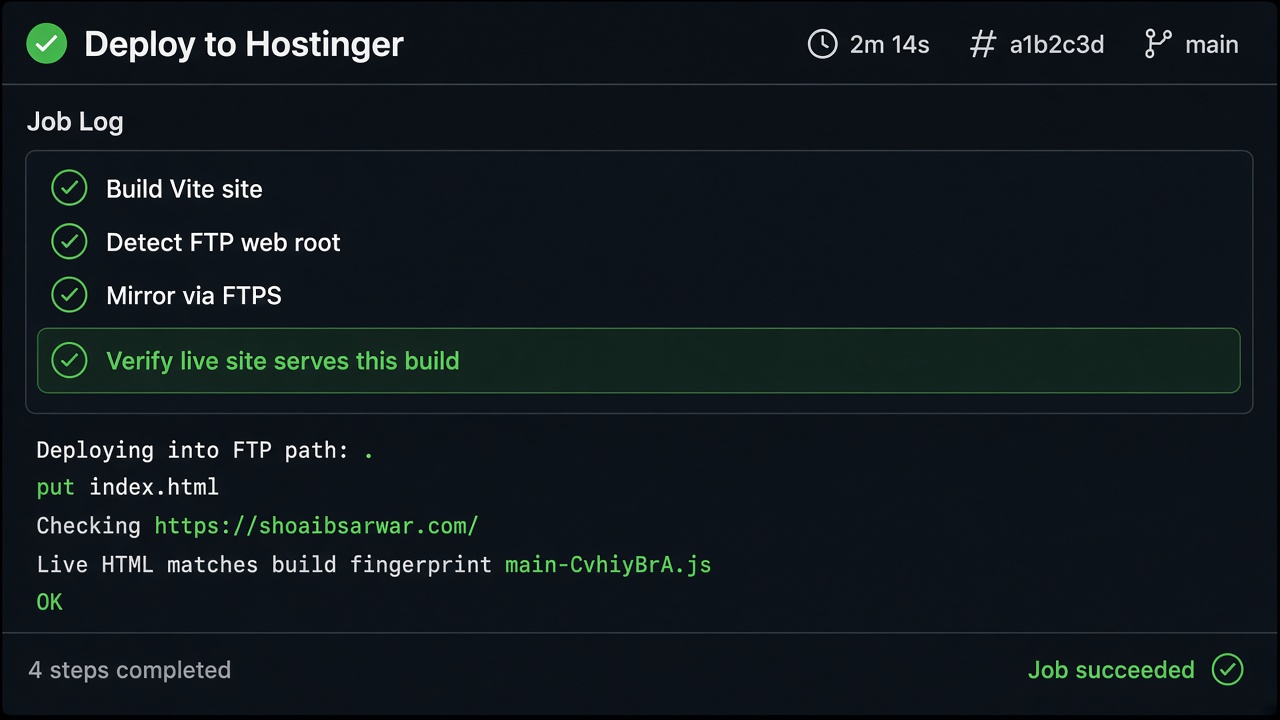
How I catch it now
A short checklist I keep next to any FTP deploy:
- Open FileZilla (or File Manager) with the same credentials CI uses. Note the starting path.
- If you already see
index.htmlthere, remote dir should be./, notpublic_html/. - After deploy, curl or open the public URL and look for a fingerprint from this build (hashed asset name, title text, whatever you control).
- Make that check fail the workflow. A green job that never touches the live document is worse than a red one.
Takeaway
Deploy success is not “FTP accepted the files”. Deploy success is “the URL visitors hit serves this build”. Path defaults copy-pasted from hosting tutorials are not neutral. They assume a specific FTP home directory. Mine did not match that assumption.
I learned that on my own portfolio, in a one-line YAML default that looked completely normal. Tutorials rarely spend a chapter on “your CI lied because the folder was nested”. Production did.
CI war grün. Die Live-Site blieb alt.
Veröffentlicht: 3. November 2026 · 5 Min. Lesezeit · Autor: Shoaib Sarwar
Ich habe GitHub Actions so eingerichtet, dass dieses Portfolio bei jedem Push auf
main per FTPS zu Hostinger deployed. Vite-Build, Dateien hochladen, fertig. So der Plan.
Der Workflow nutzte SamKirkland/FTP-Deploy-Action. Secrets für Host, Benutzer und Passwort
waren gesetzt. Der Job endete mit einem grünen Haken. Ich habe shoaibsarwar.com neu geladen und die alte Version gesehen.
Zuerst habe ich sinnlos debuggt. Hard Refresh. Anderer Browser. Ein paar Minuten auf „Propagation“ gewartet. Nichts davon half, weil die neuen Dateien nie dort lagen, wo die Domain hinsieht.
Diese Kombination nervt. CI sagt Erfolg. Der Browser sagt: nichts geändert.
Was schiefging
In .github/workflows/git-cli.yml hatte ich den Remote-Ordner so als Default gesetzt:
server-dir: ${{ secrets.HOSTINGER_REMOTE_DIR || 'public_html/' }}
Bei Hostinger öffnet ein FTP-Konto oft schon innerhalb des Website-Verzeichnisses
(in hPanel häufig public_html). Von diesem Login aus ist public_html/ nicht
„das Web-Root“, sondern ein Unterordner mit dem Namen public_html.
Die Action hat also nach public_html/public_html/ hochgeladen.
Das echte Site-Root — der Ordner, den die Domain wirklich ausliefert — bekam den neuen Build nicht.
Der Job war trotzdem grün, weil der Upload technisch geklappt hat. Nur am falschen Ort.
Im Hostinger-Dateimanager war es klar: die gewohnten Site-Dateien im echten Web-Root, und daneben ein
verschachtelter Ordner public_html mit dem „erfolgreichen“ Deploy. Peinlich — und leicht zu übersehen,
wenn man nur den Actions-Tab anstarrt. Das Bild darunter ist eine Illustration dieser Struktur, kein Screenshot aus meinem Konto.
Relatives server-dir hängt am Startverzeichnis des FTP-Kontos — nicht an „der Domain“.
Warum das wirklich passiert ist
Ich habe public_html als universellen Namen für „dort liegen Websites“ behandelt.
Auf Shared Hosting steht dieses Label überall, deshalb wirkte der Default harmlos. War er nicht.
FTP-Pfade sind relativ zum Home-Verzeichnis des Kontos. Hostinger beschreibt in der Doku, dass man das
Directory eines FTP-Kontos auf public_html setzen kann — dann landet der Login schon im Web-Ordner.
Die FTP-Deploy-Action sagt: server-dir ist standardmäßig ./ (FTP-Root), und ein Wert
wie public_html/ ist ein zusätzlicher Ordner darunter.
Mein Default hat beide Bedeutungen gestapelt. Grünes CI bewies nur: irgendwo, wohin der FTP-User schreiben darf, liegen neue Bytes. Es bewies nicht, dass die öffentliche URL diesen Build ausliefert.
So habe ich es behoben
Commit 6ad5614 hat den Default von public_html/ auf ./ geändert.
3559229 dokumentiert die Verschachtelungsfalle in den Workflow-Kommentaren:
# IMPORTANT: Do NOT set HOSTINGER_REMOTE_DIR to "public_html" when FTP already
# opens inside public_html — that creates public_html/public_html/ (wrong).
# Leave HOSTINGER_REMOTE_DIR unset so server-dir is "./" (site root).
server-dir: ${{ secrets.HOSTINGER_REMOTE_DIR || './' }}
Später habe ich aufgehört, nur dem Upload zu vertrauen. Derselbe Workflow erkennt jetzt, ob
index.html am FTP-Login-Root oder unter public_html liegt, spiegelt dorthin
mit lftp und lässt den Job fehlschlagen, wenn die Live-HTML nicht zum gerade gebauten Stand passt
(siehe u. a. 5e7f19a und aa7a999). Liefert die öffentliche Seite noch einen alten
gehashten main-….js-Namen, wird die Pipeline rot. Genau diesen Check hätte ich am ersten Tag gebraucht.
So fange ich es heute ab
Kurze Checkliste neben jedem FTP-Deploy:
- Mit denselben Credentials wie CI in FileZilla (oder den Dateimanager) gehen. Startpfad notieren.
- Liegt dort schon
index.html, gehört Remote auf./— nicht aufpublic_html/. - Nach dem Deploy die öffentliche URL prüfen: Fingerprint aus genau diesem Build (gehashter Asset-Name, Titeltext, …).
- Diesen Check den Workflow fehlschlagen lassen. Ein grüner Job, der das Live-Dokument nie berührt, ist schlimmer als ein roter.
Fazit
Deploy-Erfolg heißt nicht „FTP hat die Dateien angenommen“. Deploy-Erfolg heißt: „Die URL, die Besucher öffnen, liefert diesen Build.“ Pfad-Defaults aus Hosting-Tutorials sind nicht neutral. Sie setzen ein bestimmtes FTP-Home voraus. Meines passte nicht dazu.
Das habe ich an meinem eigenen Portfolio gelernt — an einer YAML-Zeile, die völlig normal aussah. Tutorials widmen selten ein Kapitel dem Satz „dein CI hat gelogen, weil der Ordner verschachtelt war“. Die Produktion schon.